
Fiverr introduction
Fiverr is an online marketplace that connects freelancers with clients looking for digital services. Launched in 2010, Fiverr has grown into one of the most popular platforms for freelance work, covering categories such as graphic design, writing, programming, video editing, digital marketing, and more. The name “Fiverr” originally came from the idea that services (called “gigs”) started at just $5, though today, freelancers can charge much higher based on the scope of work.
If you’re wondering how does Fiverr work, it’s quite simple. Freelancers create profiles and list their services as gigs. Buyers browse these gigs, check ratings, and place an order based on their needs. Once the work is completed and approved, Fiverr processes the payment and delivers it to the freelancer after deducting a service fee. The platform provides a secure way for clients and freelancers to collaborate without worrying about payments or fraud.
You can read more on how Fiverr works below in the article, where we have shared a complete step-by-step process on the working system of Fiverr.
How Does Fiverr Work? A Short Answer
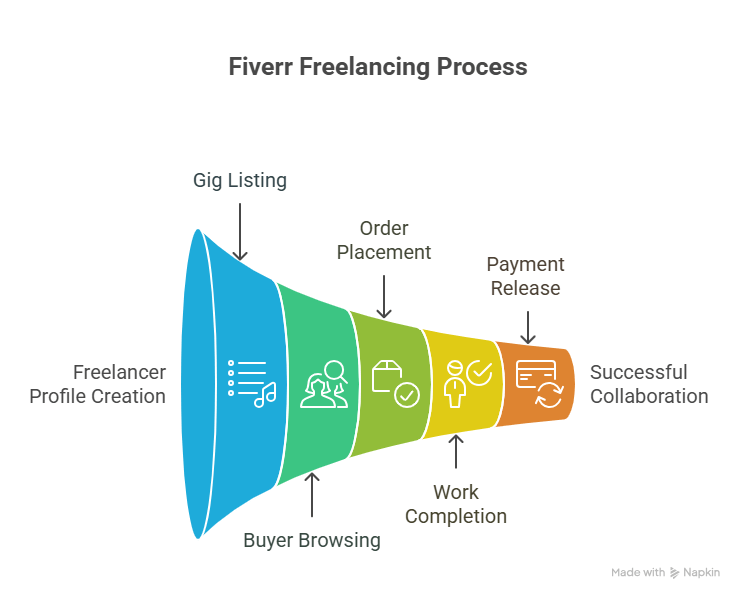
Fiverr is an online freelancing site where services known as gigs are offered by freelancers to clients who are seeking any online services such as content writing, SEO, web and app development, graphics design, and a lot more. Understanding how Fiverr works is very simple:Freelancers create their profile and list their gig, which describes what they offer. The prices of the gigs depend on their quality of work and experience, which can start from $5 and go up to $100.
Buyers who are the clients can browse through all the gigs listed on the site, read reviews about freelancers offering the gig, compare prices, and choose a freelancer that suits them. Once the buyer places the order, the payment is kept in escrow by Fiverr until the work is completed and fully accepted by the buyer.
Fiverr takes a 20% commission based on the total value of the gig. Fiverr also offers features such as messaging, file sharing, and order tracking. The platform ensures transparency and security, making it a reliable space for freelancers and clients to connect and collaborate.
Related Content: Fiverr Scams
How Does Fiverr Work for Freelancers?
1. Profile creation
If you want to understand how Fiverr works for freelancers, the first and most important step is to create a profile on Fiverr. A Fiverr profile will act as a digital resume for online freelancers who are seeking remote work and job opportunities. The profile creation process is very easy, and one can simply do it by their Gmail account and fill in a few basic details.
Although the profile creation process on Fiverr is easy, it should be done with complete caution and care, as Fiverr’s internal team will verify and then only approve the profile if they find it fit and valuable to their platform.
A few of the important things to keep in mind while creating your Fiverr profile are:
- Fill in your complete and real name in the profile. Using a fake name and email address will get you banned from the platform sooner or later.
- Use a nice and professional headshot photo that shows your face. Avoid flashy and cool-looking pictures. Your profile must not have an image of someone else, a celebrity, or a misrepresentation of your service.
- In the description section, you can introduce yourself to the Fiverr community and tell about your service and offerings. You can highlight your projects done, experiences, and successful work completed.
By following all these guidelines, you can create a nice and decent-looking Fiverr account and also get it approved soon.
2. Account verification
As a part of understanding how Fiverr works for freelancers, account verification is an important and crucial step. Once you have created a profile on Fiverr, you must get it verified to get fully started on the platform. Fiverr will ask you to verify your identity through official documents like a government ID or phone number. The verification process is important, as it adds an additional layer of security for both buyers and freelancers and helps maintain the credibility of the platform.
Verified profiles on Fiverr get more jobs compared to profiles that are not verified. Plus, they look reliable and are more likely to be picked by the clients. For freelancers, verifications help unlock the premium features and may even improve the visibility of their gig on Fiverr.
Skipping this step can lead to restricted access or even account suspension. So, if you’re seriously exploring how Fiverr works for long-term success, verifying your account early on is highly recommended. It also helps you qualify for programs like Fiverr Pro in the future.
Related Content: Is Fiverr Worth It?
3. Creating a gig
The next important step is creating a gig, which is the core of how Fiverr works for freelancers. A gig is one of the most important parts of a freelancer’s profile, where they list their service offering on the Fiverr marketplace. You can create a gig from your profile by clicking My Profile > Create a New Gig.
Give the title of your Gig, select the category in which you would like to promote your gig, give a nice and descriptive meta description, and add some search tags to increase the visibility of the gig.
Some of the best gigs on Fiverr would look like this:
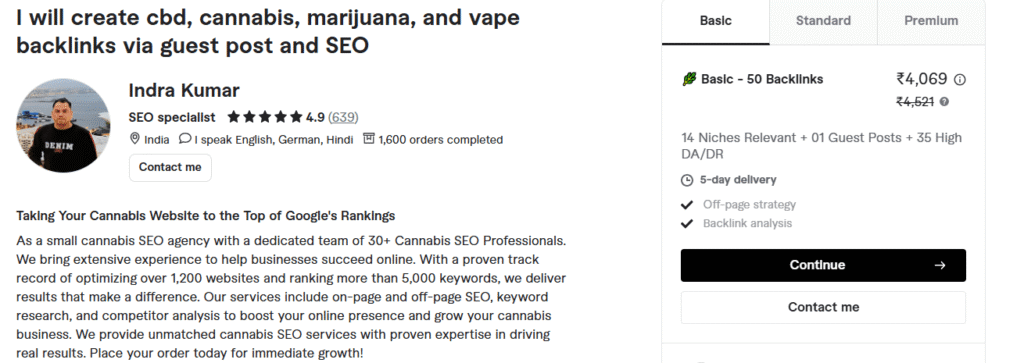
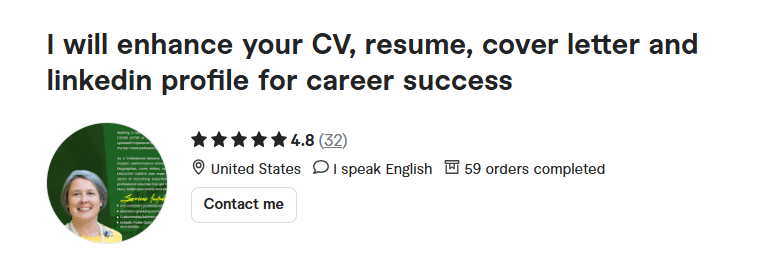
This gig, created by a freelancer, looks good. It clearly mentions in the title what services he is offering, and there is a brief description about the service offering, along with pricing and packages on the right side.
While creating your gig, you should keep in mind to add FAQs, relevant tags, and some SEO keywords with search volume to make your gig easily searchable on Fiverr. High-quality thumbnail images also play an important role, as they will enable a client to click on your profile.
Think of your gig as a storefront: it should grab the attention of the client and must be able to clearly communicate about the offering and why you are worth choosing as the best freelancer over others. If you are someone who is still wondering how Fiverr works, then creating a profile and gig will surely help you understand better.
4. Optimizing profile
After you have created your profile and gig, the next step in understanding how Fiverr works efficiently is by understanding and optimizing your profile. Until and unless you optimize your profile on Fiverr, your profile and gig won’t be appearing in the search for the organic keywords. When a client types a particular service that he is seeking on Fiverr’s organic search bar, your gig and profile should appear.
You can start by using keywords in your gig title and making it more SEO friendly.
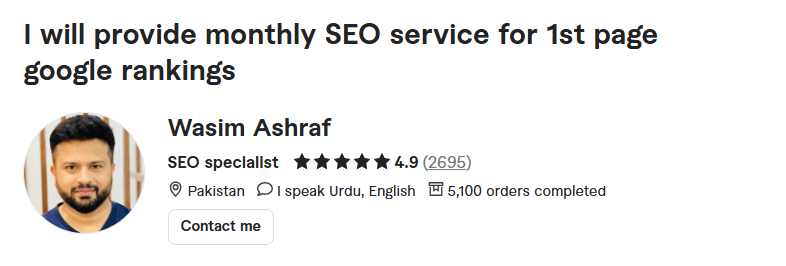
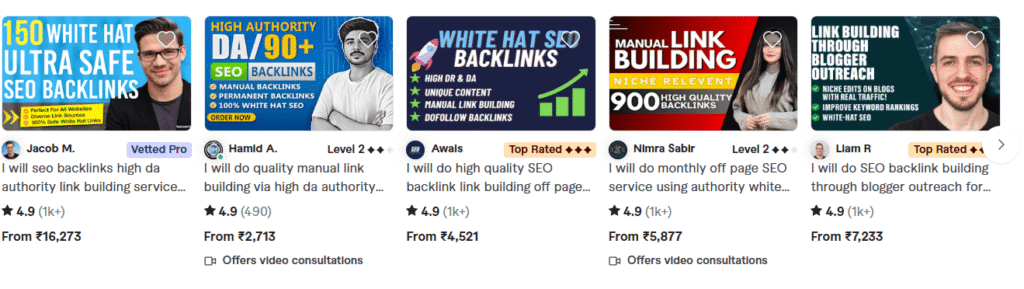
In the above image, the freelancer is offering SEO services and has clearly mentioned that in the title of the gig. This gives him an edge and better visibility on the platform when a client is searching for SEO services or related keywords.
Besides the title, you should also be focusing on writing a decent and brief description about your services, expertise, and experience, which will further improve your profile’s visibility.
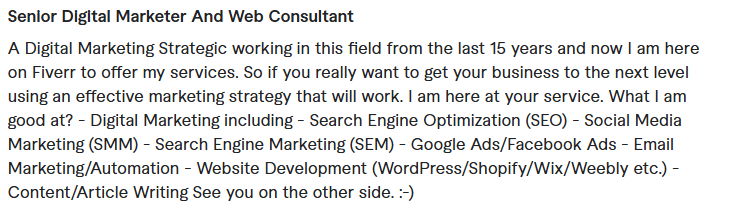
Make sure to be precise and honest and also include all your experiences and links to work samples, if any.
Lastly, you can add some tags to further increase the reach and boost the visibility to the next level. Tags are not mandatory, but they might help a bit.
An optimized profile can dramatically improve your chances of getting discovered by potential buyers. Use Fiverr Analytics to review gig impressions, clicks, and conversions, and tweak your content accordingly.
Also, make sure to keep a high response rate on your profile. When a client asks or reaches out to you, make sure you reply to their query within a few hours or minutes, as Fiverr works to promote your gig depending on the activity level of your profile. Staying active for a while, collecting reviews, and being consistent will promote your gigs organically in the long term.
Related Content: Is Upwork Worth It?
5. Getting reviews on the profile
If you personally ask us what the most important thing is on Fiverr for freelancers, then we would surely say getting reviews. Credibility and reviews are the golden ticket to making loads of money on Fiverr. If your profile has a good number of reviews, you would surely start getting work automatically without even reaching out to any of the clients or business owners.
Once a client likes your profile, they will directly check for the reviews to know how much work you have done. Reviews will give them an overview of your service offering, style of working, and more. However, getting reviews on Fiverr is not simple, and new freelancers often struggle with getting reviews. Our advice to them would be to work for free during the first few months and ask the client for a review in return for free work.
Reviews on Fiverr are important, as they are part of Fiverr’s ranking algorithm in determining the visibility of your gig. Keep in mind to have as many reviews as possible on your profile to make it look genuine and good and rank on top in organic listings. Also, avoid cancelling orders and any type of conflict with the client, as it might affect your ranking and rating.
If you’re still learning how Fiverr works to build long-term credibility, remember that accumulating good reviews is your most effective growth strategy.
6. Video description
Adding a video description to your gig is a game-changer and an often overlooked secret in mastering how Fiverr works. Fiverr has publicly stated that gigs with videos perform better in search results and have higher conversion rates.
Your video should briefly introduce yourself, explain your gig offerings, and include a call to action. Keep it under a minute, use clear audio, and ensure it aligns with your brand. For example, if you’re a voice-over artist, showcase your voice; if you’re a designer, highlight past projects.
This not only builds trust but also allows potential clients to connect with you on a more personal level. A video helps buyers understand your personality and professionalism, which text alone may not fully convey.
So if you’re serious about learning how Fiverr works to boost sales, investing in a professional gig video can significantly improve your click-through and order rates.
Related content: Is Fiverr legit and safe?
How Does Fiverr Work for Clients?
Now that you have understood how Fiverr works for freelancers, let us now take a look at how Fiverr works for clients or businesses that want to get their job done.
1. Simple Sign-in with Gmail Account
Signing up on Fiverr as a client or business is very simple and easy. You just have to use your Gmail credentials and integrate it with Fiverr. Once done, your account will be created.
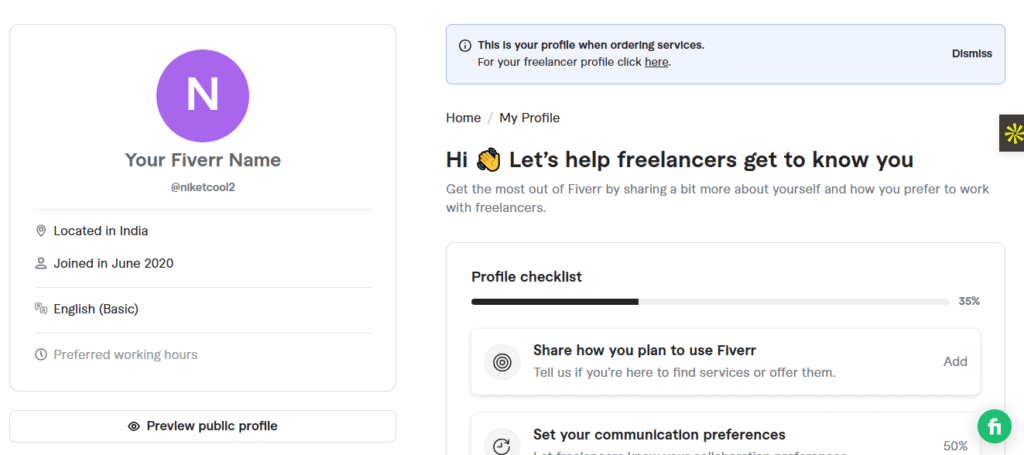
Once your account is created, you can head over to your profile and complete all the details mentioned in order to make your client profile look genuine and legit. You need to make your profile 100% complete.
You can start by adding on how you want to use Fiverr.
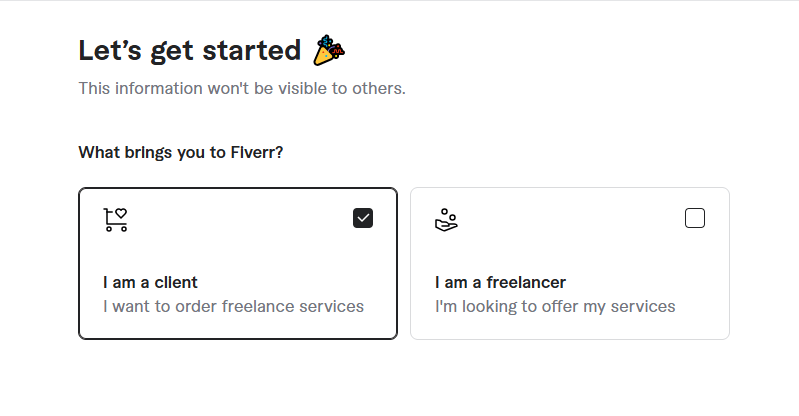
Choose the “I am client option and select next.
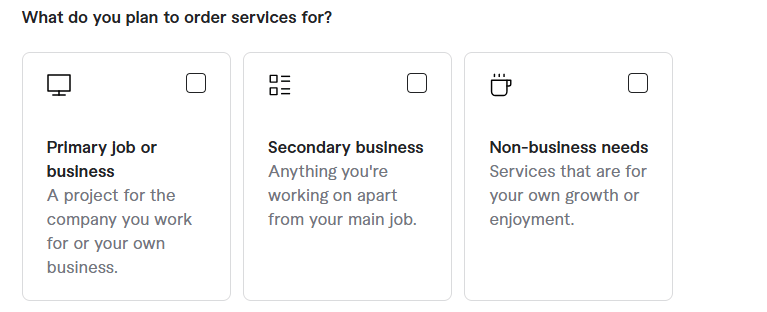
Now select what type of business you are running.
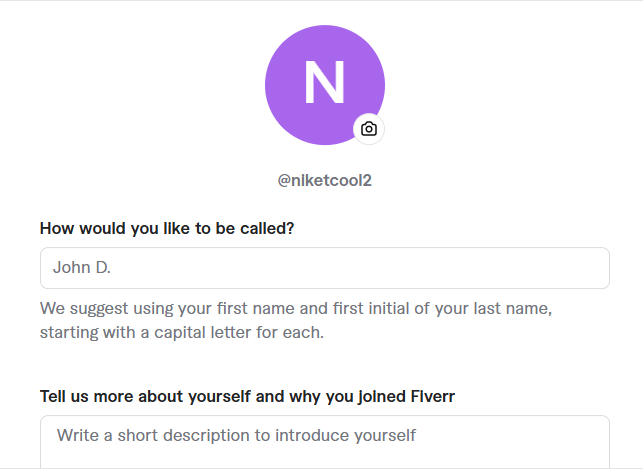
Once done, you will now have to give your personal details for more optimization.
For the personal details, you will have to add the profile name and add some more information about yourself that describes you in more detail. You can write a short summary about yourself, your experiences, and why you are using Fiverr. Also, make sure to use a decent headshot profile photo, which adds more authenticity to your profile.
After you complete filling in your personal information, you have to set some preferences.
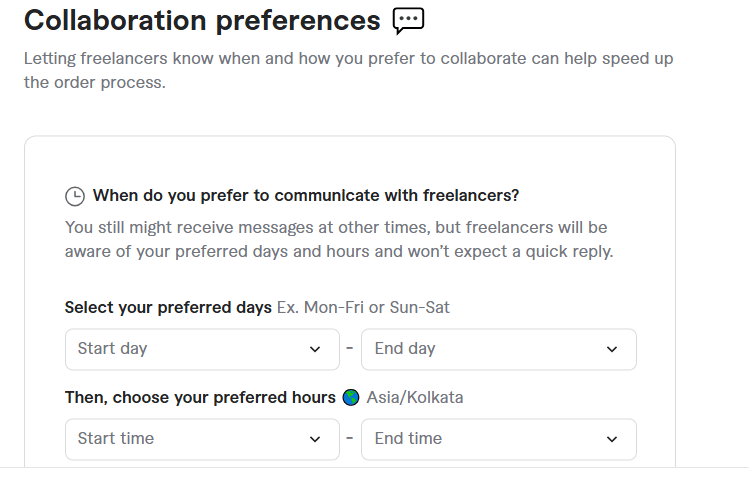
Set your collaboration preferences to a time when you are available the most. During these times, freelancers will be able to reach out to you and answer your queries and doubts regarding the services you want to opt for.
After completing these basic steps, your profile as a client on Fiverr will be created.
2. Search for Freelancers Based on Category

Once your profile as a client is completed in Fiverr, now it is time for you to look for freelancers based on the job category. Luckily, Fiverr has 100+ categories of jobs listed and freelancers offering these services. You can surely select the category that is closely related to the niche of your project and look for freelancers.
Another good thing about Fiverr is that it has categories and subcategories to help clients and businesses find the best-suited freelancer for them.
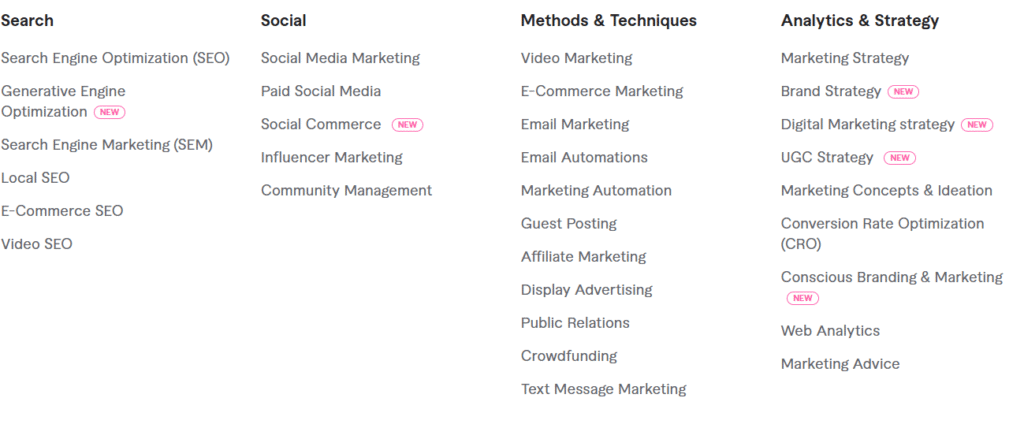
Above, you can see the subcategories for digital marketing-related services. Anyone who is seeking services or looking for freelancers who can offer digital marketing or related services.
Once you have decided on your subcategory, then you need to choose a freelancer or pitch your project to them. However, keep the following things in mind when hiring a freelancer on Fiverr:
Related content: Is Upwork Safe and Legit?
Things to Consider When Hiring a Freelancer on Fiverr:
- Star Rating: Look for freelancers with a 4.7+ rating.
- Read Reviews: Go through client feedback to assess reliability and quality.
- Check Previous Work: Review portfolios and work samples to gauge skill level.
- Clear Gig Description: Ensure the gig is detailed and aligns with your project needs.
- Response Time: Choose freelancers who respond promptly to messages.
- Order Requirements: Make sure the freelancer clearly outlines what they need from you.
- Revisions Policy: Understand how many revisions are included and the turnaround time.
- Compare Packages: Evaluate different pricing tiers and deliverables offered.
- Level Badge: Consider working with Level 1, Level 2, or Top Rated Sellers for proven performance.
Related content: Is Upwork Safe and Legit?
3. Post a Job
When someone asks how Fiverr works for clients, one of the most common questions is how to post a job on Fiverr. Unlike many traditional freelancing sites, Fiverr has a simple and straightforward job posting option. Buyers have to create a request, which acts like a job ad, and freelancers can apply for that job. Of course, there are a few things that need to be kept in mind, but the job posting process on Fiverr is simple.
Here’s how to post a job on Fiverr:
Head over to your Fiverr client account.

Then on the right side of your Fiverr account, you will find a brief post where all the fun starts. This option is only available to the USA and some Western countries, and clients from Asia cannot access this feature as of now.
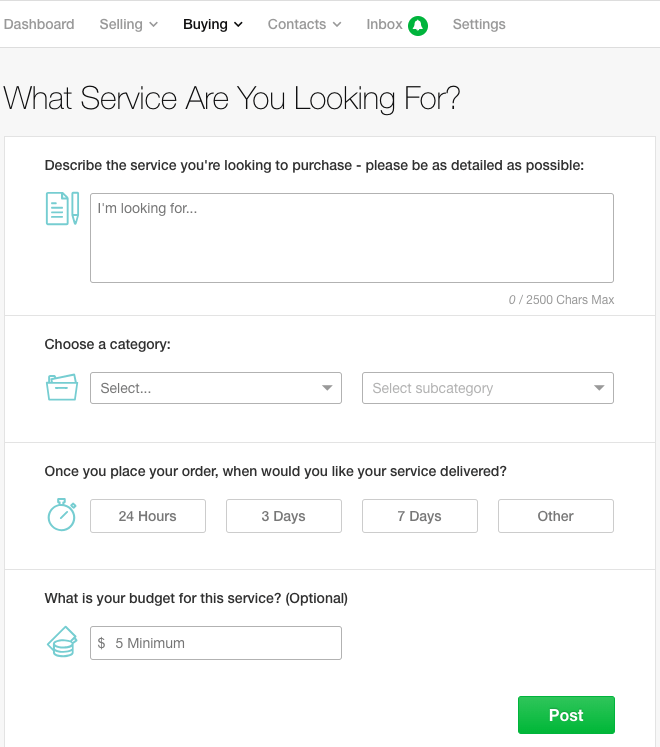
In posting a brief post, you need to fill in each and every detail about the job description for which you want to hire the freelancer. In the “Describe Your Service” section, be as specific as you can in the 2000-character limit. This will make it easy for the freelancers to respond with an accurate offer. Then you have to choose the category in which your job falls and then a subcategory. You also need to select your timeline by when you are expecting the project to be completed and finally, the budget.
This process makes Fiverr unique because instead of searching endlessly, sellers come directly to you with tailored proposals. If you’re learning how Fiverr works, posting a request is one of the fastest ways to find the right freelancer for your project.
Related content: Sites like Upwork
4. Place the Order
When learning about how Fiverr works, it is important to know how to place a gig order on Fiverr from the client’s point of view. Fiverr makes the order placement process quick, simple, and easy. Once you have found the right freelancer for the job, you need to go to their gig profile page, review their services, check the pricing and delivery time, and then place the order.
Here are the steps to follow:
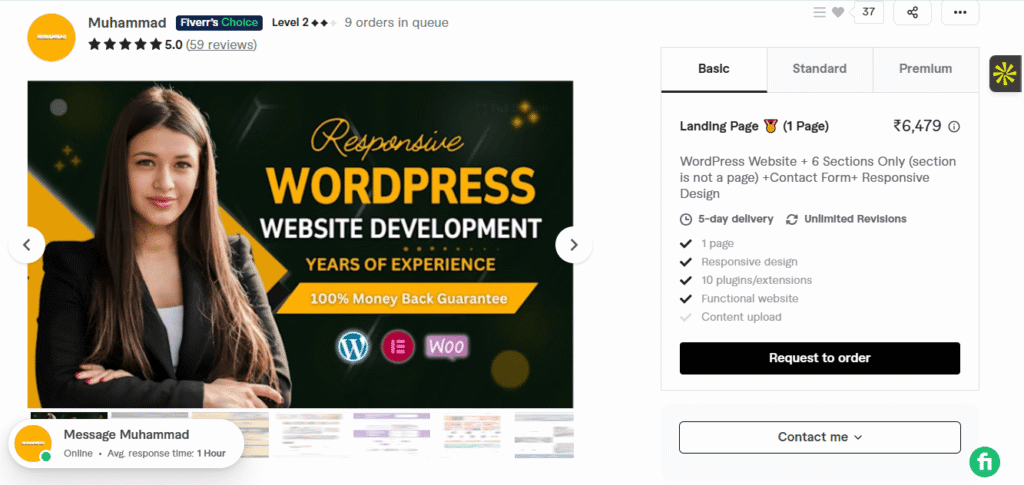
Once you are on the freelancer’s profile, click on Request To Order. Once you do that, you need to mention your project and share all the relevant details with the freelancer so they can have a look into it.
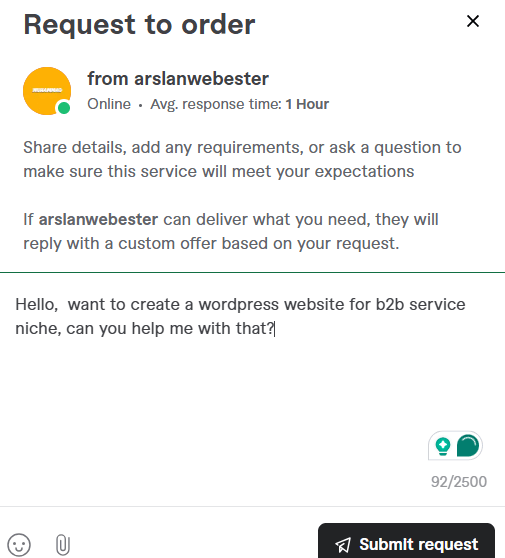
Then click on Submit request. Your request and proposal to hire will be sent to the freelancer, and they will reply as soon as possible. Once you get a reply from the freelancer, they will send you an order request to hire them and get started with the work.
Currently, all the freelancers offer three different pricing packages on Fiverr, but you can also ask for a custom offer.
After placing the order, the freelancer will begin work. You can track progress through Fiverr’s dashboard, communicate with the seller, and request revisions if needed. Once the work is approved, Fiverr releases the payment to the freelancer.
Related content: Upwork vs. Fiverr
5. Get Work Done by a Freelancer
Another way to understand how Fiverr works is by looking at how freelancers deliver their work. Once you place the order on Fiverr, the seller gets all your project details and starts within the agreed-upon timeline. You can also stay in touch with freelancers via Fiverr’s internal communication tools, where both you and the freelancer can talk and share files and track progress.
During this process, you can also request some updates or revisions if the work needs some modifications or changes. Fiverr makes sure for smooth communication and keeps everything documented within the order page, so there is no confusion.
When the freelancer completes the work, they’ll submit it through Fiverr for your review. You can either accept the delivery, ask for modifications, or reject it if it doesn’t meet your expectations. Once you approve, the payment is released to the freelancer, ensuring a fair and secure process for both sides.
How Does Fiverr Work for Beginners?
If you’re just starting out on freelancing platforms, you might be wondering: how does Fiverr work for beginners? Well, Fiverr is one of the biggest freelance marketplaces out there, where businesses and individuals can connect with talented professionals offering services like design, writing, marketing, video editing, and so much more. Whether you’re looking to make some extra cash as a freelancer or need to outsource tasks for your business, Fiverr is built to make everything straightforward, secure, and efficient.
Why is Fiverr perfect for beginners?
For beginners, Fiverr is one of the easiest places to start because it does not require experience or a big portfolio like Upwork. Also, it is less competitive as compared to other freelancing sites, making it easy for beginners and newbies to make quick money by selling their services.
Beginners on Fiverr start with simple services like logo designing, social media posts, blog and content writing, or video editing. Fiverr also has a good pool of clients from Asia, the UK, and the USA, which might help beginners to earn in foreign currencies by protecting both buyers and sellers with secure payment methods. So, beginners don’t need to worry about Fiverr fraud.
Related content: Fiverr Reviews
Steps to get started on Fiverr as a beginner
If you’re just starting, here’s how Fiverr works for beginners in simple steps:
Sign Up and Create a Profile: First, you need to create a profile on Fiverr by adding your photo, description, and highlighting your skills. We have mentioned more about this above in detail.
Set Up a Gig: Then comes creating your gig by clearly describing what service you’re offering, your price, and delivery time. Try to be clear, accurate, and precise with your description of the gigs so that clients can understand your offering easily.
Start Small: As a beginner, you might need to work for free for some time. A good trick can be to offer gigs at lower prices and faster delivery.
Communicate Clearly: Always chat with your client before starting any work to avoid confusion. Ask for a clear brief and client expectations to avoid any blunders in the future.
Deliver Quality Work: Make sure your first few projects are your best; it helps build your reputation.
Collect Reviews: The only thing that can help beginners to get more jobs on Fiverr is reviews. So, make sure to collect as many reviews as possible. Also, work for free for a certain time to collect reviews.
Tips for beginners on Fiverr
Choose a Niche: Instead of offering too many services, pick one or two services you’re good at. Don’t be a jack of all trades and master of none.
Use Keywords: Add the right keywords in your gig title and description, which will help you to optimize your profile on Fiverr, and clients can find you easily.
Stay Active: Do not quit. Stay active; daily active freelancers are more likely to get orders.
Offer Packages: Provide basic, standard, and premium packages to cater to a diverse range of buyers. But if you are a beginner, then keep your prices low or offer services for free for some time.
Be Patient: The first few orders may take time, but you should be in the game for the long term. Think of it like playing a test cricket where hardwork, dedication, and consistency matter a lot rather than quick luck.
Related content: What is Fiverr used for?
How Does Fiverr Make Money?
1) Transaction Fees (two-sided)
Buyer service fee: When you check out on Fiverr, there’s a 5.5% service fee plus a $3.50 small-order fee for purchases under $100. You’ll see these charges on every payment, whether it’s for the initial order, extras, or tips.
Seller commission (“the 20% cut”): Sellers keep 80% of the order value, while Fiverr takes a 20% cut from the core marketplace sale, which also applies to tips and add-ons.
2) Seller Advertising (Fiverr Ads / Promoted Gigs)
Sellers who qualify can bid to get their gigs promoted in search results. It works on a pay-per-click (PPC) basis through an auction system, and the costs are deducted from seller earnings each month—this is how Fiverr generates direct ad revenue.
3) Subscriptions
Fiverr Pro (for buyers/teams): The Pro plan now has different tiers; the Advanced plan costs $129/month and gives you access to extra procurement and collaboration features. This is subscription revenue for Fiverr.
Seller Plus (for sellers): This is an optional monthly membership that provides analytics, quicker clearance, and some perks like a small Fiverr Ads credit.
Fiverr Help Center
4) Add-on Products & Services
Fiverr Workspace (invoicing/contracts/CRM): This offers both free and paid plans, contributing to subscription revenue outside the main marketplace.
Fiverr Workspace
Fiverr Learn/Courses: Fiverr also offers on-demand training and courses. 1) Transaction Fees (two-sided)
Buyer service fee: When you check out on Fiverr, there’s a 5.5% service fee plus a $3.50 small-order fee for purchases under $100. You’ll see these charges on every payment, whether it’s for the initial order, extras, or tips.
Seller commission (“the 20% cut”): Sellers keep 80% of the order value, while Fiverr takes a 20% cut from the core marketplace sale, which also applies to tips and add-ons.
5) Payments & Currency
Fiverr and its partners might charge fees for withdrawals and currency conversions (like fixed fees on certain Payoneer withdrawals or costs for currency conversion), which generate additional payment revenue or shared fees with processors.
Quick example (how fees stack)
If a buyer places a $100 order:
The buyer pays $100 + 5.5% = $105.50 (no small-order fee since ≥$100). Fiverr books the service fee.
The seller earns $80 after Fiverr’s 20% commission ($20 to Fiverr).
Together with ad spend/subscriptions/ancillary fees, that’s how Fiverr monetizes both sides of the marketplace. (Percentages and components per official docs above.)
Does Fiverr Work in India?
1. For Freelancers (Sellers)
Sign-up & profile: Anyone in India can create a free Fiverr account, set up gigs, and start offering services.
Payments: Fiverr pays Indian freelancers in USD, but you can withdraw earnings via:
PayPal (converted to INR)
Payoneer (direct bank transfer in INR, usually the best exchange rate)
Bank Transfer (through Payoneer integration)
Taxes: Indian freelancers need to declare Fiverr income under “Freelance/Professional Income” and may be subject to GST if crossing the threshold.
2. For Clients (Buyers)
Indian clients can buy services on Fiverr using credit/debit cards, PayPal, or UPI (via card/PayPal integration).
Fiverr charges a 5.5% service fee plus a ₹290 (approx. $3.50) fee on small orders under $100.
3. Popularity in India
Many Indian freelancers use Fiverr for gigs like graphic design, SEO, content writing, app development, and video editing.
Buyers in India also hire international freelancers at competitive rates.
So, the short answer: Yes, Fiverr works seamlessly in India for both earning and hiring freelancers.
Does Fiverr Work in Pakistan?
Yes, Fiverr works in Pakistan, and it is one of the most popular freelancing platforms in the country. Pakistani freelancers can easily create a Fiverr account, set up gigs, and start offering services such as graphic design, SEO, content writing, app development, and digital marketing.
Fiverr pays freelancers in USD, and earnings can be withdrawn through Payoneer, which directly transfers the money into Pakistani bank accounts, or via PayPal using third-party methods, though Payoneer is the most reliable and commonly used option. Payments are converted into PKR, and many freelancers find this convenient for day-to-day use.
For clients in Pakistan, Fiverr allows them to hire freelancers from anywhere in the world. Payments can be made using debit/credit cards or Payoneer balance, with Fiverr applying a small service fee on each order. This makes Fiverr equally accessible for both buyers and sellers in Pakistan.
Fiverr’s popularity has grown significantly in Pakistan due to the rising freelancing culture, government initiatives promoting online work, and the ability to earn in foreign currency. According to several reports, Pakistan ranks among the top freelancing nations worldwide, and Fiverr plays a huge role in this success.
FAQs on How Fiverr Works
Fiverr connects freelancers with clients for projects starting at $5.
No, Fiverr is free to join for both freelancers and clients.
Clients pay upfront, and Fiverr releases funds after order completion.
Yes, Fiverr works worldwide, including in India.
Yes, Fiverr secures payments and protects both buyers and sellers.